
Type Casting
Variable types in Qreli can be as follows
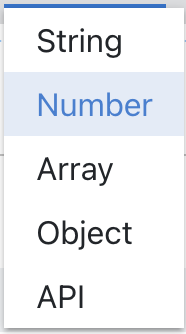
When creating a new variable, the default is Number.
If you need to change the content of a variable to another type, the following logic will apply.
Successful Conversions
String -> Numeric When it works: - the user entered text or a formula; - then changes the variable type to Numeric. What will happen: - the entered text or formula is moved into the Numeric formula field; - Numeric settings, such as decimals and separator, use the default values. Example: - Before: Text value =${V.Total}- After: Numeric formula =${V.Total}Numeric -> String When it works: - the user entered a Numeric formula; - then changes the variable type to String. What will happen: - the formula is moved into the String value; - Numeric-only settings, such as decimals, are not moved because String does not calculate on them. Example: - Before: Numeric formula =${V.Total} * 2- After: Text value =${V.Total} * 2Numeric -> Object When it works: - the user entered a formula or variable reference in Numeric; - then changes the variable type to Object. What will happen: - the value is moved into Object as a Formula; - Object is set to Create mode. Example: - Before: Numeric formula =${V.SomeObject}- After: Object, mode Create, value type Formula, value =${V.SomeObject}String -> Object When it works: - the user entered text or a formula in String; - then changes the variable type to Object. What will happen: - the value is moved into Object as a Formula; - Object is set to Create mode. Example: - Before: Text value =${V.CustomerData}- After: Object, mode Create, value type Formula, value =${V.CustomerData}Object Formula -> String When it works: - Object is set to Create mode; - the Object value is set through Formula; - the user changes the type to String. What will happen: - the Object formula is moved into the String value. Example: - Before: Object Formula =${V.CustomerName}- After: Text value =${V.CustomerName}Object Formula -> Numeric When it works: - Object is set to Create mode; - the Object value is set through Formula; - the user changes the type to Numeric. What will happen: - the Object formula is moved into the Numeric formula. Example: - Before: Object Formula =${V.Amount}- After: Numeric formula =${V.Amount}String / Numeric / Object Formula -> Array When it works: - the old type contains one value or formula; - the user changes the type to Array. What will happen: - one Create / Join action is created in Array; - the old value is moved into that action as a Formula. Example: - Before: Text value =${V.Items}- After: Array action = Create / Join, Formula =${V.Items}Array with one Formula action -> String When it works: - Array contains exactly one action; - that action is Add Item or Create / Join; - the action value is set as Formula. What will happen: - the formula from the action is moved into the String value. Example: - Before: Array action Create / Join, Formula =${V.Payload}- After: String value =${V.Payload}Array with one Formula action -> Numeric When it works: - Array contains exactly one action; - that action is Add Item or Create / Join; - the action value is set as Formula. What will happen: - the formula from the action is moved into the Numeric formula. Example: - Before: Array action Create / Join, Formula =${V.Amount}- After: Numeric formula =${V.Amount}Array with one Formula action -> Object When it works: - Array contains exactly one action; - that action is Add Item or Create / Join; - the action value is set as Formula. What will happen: - the formula from the action is moved into Object; - Object is set to Create + Formula. Example: - Before: Array action Create / Join, Formula =${V.Payload}- After: Object, mode Create, value type Formula, value =${V.Payload}Object JSON -> String When it works: - Object is set to Create mode; - the Object value is set through the JSON editor; - the user changes the type to String. What will happen: - JSON is moved into String as readable text. Example: - Before: Object JSON with plan = pro, seats = 3 - After: String value with the same JSON content as text. Object JSON -> Array When it works: - Object is set to Create mode; - the Object value is set through the JSON editor; - the user changes the type to Array. What will happen: - one Create / Join action is created in Array; - JSON is moved into that action as a JSON value. Example: - Before: Object JSON with list of items - After: Array action = Create / Join, JSON value = same list of items. Custom code between String / Numeric / Array / Object When it works: - the variable uses Custom code; - the user changes the type between String, Numeric, Array, and Object. What will happen: - Custom code is preserved; - the new type opens with a valid setup for that type; - regular value fields remain secondary because Custom code controls the final value. Example: - Before: String with Custom code - After: Object with the same Custom code Switching back and forth When it works: - the user switches a type and then returns to a previous type within the same editor session. What will happen: - if the old setup for that type was saved in the current UI session, it is fully restored; - this helps when the user changes the type accidentally. Example: - Before: Object with a detailed JSON setup - User switches Object -> Numeric - Then switches Numeric -> Object - The Object setup is restored from the UI cache instead of being rebuilt from Numeric.
Incompatible Conversions
API -> String / Numeric / Array / Object Why it is incompatible: - an API variable contains the selected API function, parameters, response mapping, stream settings, and other API-specific settings; - these settings cannot be accurately converted into a regular String, Numeric, Array, or Object value. What will happen: - the new type opens with a clean safe setup; - API-specific settings are not moved into the new type. Example: - Before: API variable with selected function and mapped response - After: Text with empty value String / Numeric / Array / Object -> API Why it is incompatible: - a regular value or formula does not contain information about which API function to select or which parameters to fill. What will happen: - the API editor opens with an empty safe setup; - the user needs to choose the API function and configure parameters again. Example: - Before: Numeric formula =${V.Total}- After: API variable with no selected function Array with multiple actions -> String / Numeric / Object Why it is incompatible: - multiple Array actions describe a process for changing an array; - that is not a single value that can be moved to Text, Numeric, or Object without changing its meaning. What will happen: - the new type opens with a clean safe setup unless that type has a saved setup in the current UI session. Example: - Before: Array with Create / Join + Add Item - After: Numeric with empty formula Array Delete / Clear action -> String / Numeric / Object Why it is incompatible: - Delete and Clear describe actions on an array; - they are not transferable values. What will happen: - the new type opens with a clean safe setup unless that type has a saved setup in the current UI session. Example: - Before: Array action Delete by Index - After: Object with empty Create + Formula setup Object Update -> String / Numeric / Array Why it is incompatible: - Object Update is a patch operation; - it is not a full Object value, but an instruction for changing an existing Object. What will happen: - the new type opens with a clean safe setup unless that type has a saved setup in the current UI session. Example: - Before: Object mode Update, Formula =${V.Patch}- After: Text with empty value Object JSON -> Numeric Why it is incompatible: - a JSON object/list cannot be safely converted into a numeric formula; - trying to move it could create an invalid numeric value. What will happen: - Numeric opens with an empty safe formula. Example: - Before: Object JSON with total = 10 - After: Numeric with empty formula Important note If the direct conversion is incompatible, but the user already opened the target type in the same UI session, the system will try to restore the saved setup for that target type from the UI cache. Example: - The user had Array with multiple actions. - Switched Array -> String, String opened empty. - Entered a Text value. - Switched String -> Array, Array was restored as it was. - Switched Array -> String, String was restored with the entered String value.